动画
您可以使用动画在变量的起始值和结束值之间自动更改其值。
动画通过周期性地调用一个“动画器”函数并传递相应的值参数来实现。
动画器函数具有以下原型:
void func(void * var, lv_anim_var_t value);
此原型与 LVGL 中大多数属性设置函数兼容。例如 lv_obj_set_x(obj, value) 或 lv_obj_set_width(obj, value)。
创建动画
要创建动画,需要初始化一个 lv_anim_t 变量,并使用 lv_anim_set_...() 函数进行配置。
/* 初始化动画
 *-----------------------*/

lv_anim_t a;
lv_anim_init(&a);

/* 必需设置
 *------------------*/

/*设置“动画器”函数*/
lv_anim_set_exec_cb(&a, (lv_anim_exec_xcb_t) lv_obj_set_x);

/*设置动画目标*/
lv_anim_set_var(&a, obj);

/*动画时长 [毫秒]*/
lv_anim_set_time(&a, duration);

/*设置起始值和结束值。例如 0, 150*/
lv_anim_set_values(&a, start, end);

/* 可选设置
 *------------------*/

/*动画开始前的等待时间 [毫秒]*/
lv_anim_set_delay(&a, delay);

/*设置路径(曲线)。默认是线性*/
lv_anim_set_path(&a, lv_anim_path_ease_in);

/*设置动画完成(空闲)时的回调函数*/
lv_anim_set_ready_cb(&a, ready_cb);

/*设置动画删除(空闲)时的回调函数*/
lv_anim_set_deleted_cb(&a, deleted_cb);

/*设置动画开始(延迟后)时的回调函数*/
lv_anim_set_start_cb(&a, start_cb);

/*动画完成后以此时长反向播放。默认是 0(禁用)[毫秒]*/
lv_anim_set_playback_time(&a, time);

/*反向播放前的延迟。默认是 0(禁用)[毫秒]*/
lv_anim_set_playback_delay(&a, delay);

/*重复次数。默认是 1。使用 LV_ANIM_REPEAT_INFINITE 表示无限重复*/
lv_anim_set_repeat_count(&a, cnt);

/*重复前的延迟。默认是 0(禁用)[毫秒]*/
lv_anim_set_repeat_delay(&a, delay);

/*true(默认):立即应用起始值;false:在动画真正开始时(延迟后)应用起始值。*/
lv_anim_set_early_apply(&a, true/false);

/* 开始动画
 *------------------*/
lv_anim_start(&a);                             /*开始动画*/
您可以同时对同一变量应用多个不同的动画。
例如,使用 lv_obj_set_x 和 lv_obj_set_y 分别动画化 x 和 y 坐标。
但是,对于给定的变量和函数对,只能存在一个动画,并且 lv_anim_start() 会移除该对的任何现有动画。
动画路径
您可以控制动画的路径。最简单的情况是线性路径,这意味着在起始值和结束值之间的当前值以固定步长更改。
路径是一个函数,它根据动画的当前状态计算要设置的下一个值。目前,有以下内置路径函数:
lv_anim_path_linear线性动画lv_anim_path_step在结束时一步完成lv_anim_path_ease_in开始时较慢lv_anim_path_ease_out结束时较慢lv_anim_path_ease_in_out开始和结束时较慢lv_anim_path_overshoot超过结束值lv_anim_path_bounce从结束值稍微反弹(如撞墙)
速度与时间
默认情况下,您直接设置动画时间。但在某些情况下,设置动画速度更为实用。
lv_anim_speed_to_time(speed, start, end) 函数计算从起始值以给定速度到达结束值所需的时间(毫秒)。
速度的单位是 单位/秒。例如,lv_anim_speed_to_time(20,0,100) 将返回 5000 毫秒。
例如,对于 lv_obj_set_x,单位是像素,因此 20 表示 20 像素/秒 的速度。
删除动画
如果提供了动画变量和其动画器函数,可以使用 lv_anim_del(var, func) 删除动画。
时间轴
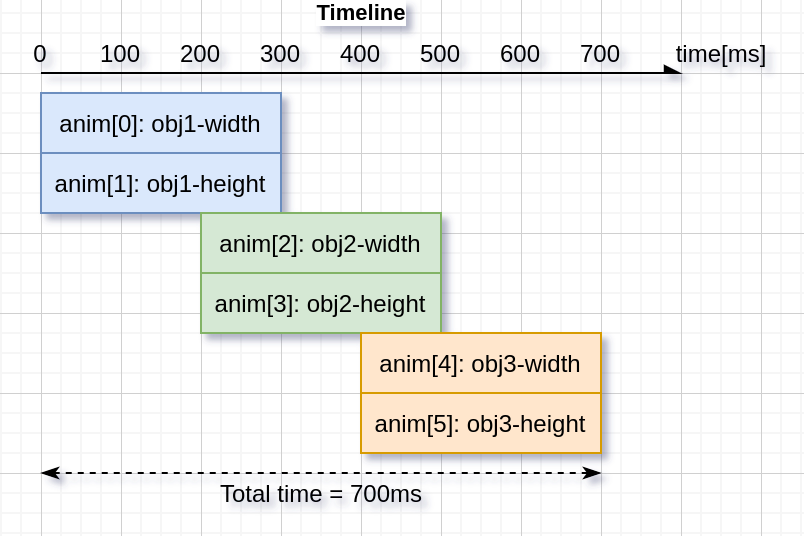
时间轴是多个动画的集合,使创建复杂的组合动画变得容易。
首先,创建动画元素,但不要调用 lv_anim_start()。
其次,通过调用 lv_anim_timeline_create() 创建一个动画时间轴对象。
然后,通过调用 lv_anim_timeline_add(at, start_time, &a) 将动画元素添加到动画时间轴中。start_time 是动画在时间轴上的开始时间。注意,start_time 将覆盖 delay 的值。
最后,调用 lv_anim_timeline_start(at) 开始动画时间轴。
它支持整个动画组的正向和反向播放,使用 lv_anim_timeline_set_reverse(at, reverse)。
调用 lv_anim_timeline_stop(at) 停止动画时间轴。
调用 lv_anim_timeline_set_progress(at, progress) 函数设置与时间轴进度对应的对象状态。
调用 lv_anim_timeline_get_playtime(at) 函数获取整个动画时间轴的总持续时间。
调用 lv_anim_timeline_get_reverse(at) 函数获取动画时间轴是否反向。
调用 lv_anim_timeline_del(at) 函数删除动画时间轴。
示例
在事件上启动动画
C code
GitHub#include "../lv_examples.h"
#if LV_BUILD_EXAMPLES && LV_USE_SWITCH
static void anim_x_cb(void * var, int32_t v)
{
lv_obj_set_x(var, v);
}
static void sw_event_cb(lv_event_t * e)
{
lv_obj_t * sw = lv_event_get_target(e);
lv_obj_t * label = lv_event_get_user_data(e);
if(lv_obj_has_state(sw, LV_STATE_CHECKED)) {
lv_anim_t a;
lv_anim_init(&a);
lv_anim_set_var(&a, label);
lv_anim_set_values(&a, lv_obj_get_x(label), 100);
lv_anim_set_time(&a, 500);
lv_anim_set_exec_cb(&a, anim_x_cb);
lv_anim_set_path_cb(&a, lv_anim_path_overshoot);
lv_anim_start(&a);
}
else {
lv_anim_t a;
lv_anim_init(&a);
lv_anim_set_var(&a, label);
lv_anim_set_values(&a, lv_obj_get_x(label), -lv_obj_get_width(label));
lv_anim_set_time(&a, 500);
lv_anim_set_exec_cb(&a, anim_x_cb);
lv_anim_set_path_cb(&a, lv_anim_path_ease_in);
lv_anim_start(&a);
}
}
/**
* Start animation on an event
*/
void lv_example_anim_1(void)
{
lv_obj_t * label = lv_label_create(lv_scr_act());
lv_label_set_text(label, "Hello animations!");
lv_obj_set_pos(label, 100, 10);
lv_obj_t * sw = lv_switch_create(lv_scr_act());
lv_obj_center(sw);
lv_obj_add_state(sw, LV_STATE_CHECKED);
lv_obj_add_event_cb(sw, sw_event_cb, LV_EVENT_VALUE_CHANGED, label);
}
#endif
def anim_x_cb(label, v):
    label.set_x(v)

def sw_event_cb(e,label):
    sw = e.get_target()

    if sw.has_state(lv.STATE.CHECKED):
        a = lv.anim_t()
        a.init()
        a.set_var(label)
        a.set_values(label.get_x(), 100)
        a.set_time(500)
        a.set_path_cb(lv.anim_t.path_overshoot)
        a.set_custom_exec_cb(lambda a,val: anim_x_cb(label,val))
        lv.anim_t.start(a)
    else:
        a = lv.anim_t()
        a.init()
        a.set_var(label)
        a.set_values(label.get_x(), -label.get_width())
        a.set_time(500)
        a.set_path_cb(lv.anim_t.path_ease_in)
        a.set_custom_exec_cb(lambda a,val: anim_x_cb(label,val))
        lv.anim_t.start(a)

#
# Start animation on an event
#

label = lv.label(lv.scr_act())
label.set_text("Hello animations!")
label.set_pos(100, 10)


sw = lv.switch(lv.scr_act())
sw.center()
sw.add_state(lv.STATE.CHECKED)
sw.add_event_cb(lambda e: sw_event_cb(e,label), lv.EVENT.VALUE_CHANGED, None)
回放动画
C code
GitHub#include "../lv_examples.h"
#if LV_BUILD_EXAMPLES && LV_USE_SWITCH
static void anim_x_cb(void * var, int32_t v)
{
lv_obj_set_x(var, v);
}
static void anim_size_cb(void * var, int32_t v)
{
lv_obj_set_size(var, v, v);
}
/**
* Create a playback animation
*/
void lv_example_anim_2(void)
{
lv_obj_t * obj = lv_obj_create(lv_scr_act());
lv_obj_set_style_bg_color(obj, lv_palette_main(LV_PALETTE_RED), 0);
lv_obj_set_style_radius(obj, LV_RADIUS_CIRCLE, 0);
lv_obj_align(obj, LV_ALIGN_LEFT_MID, 10, 0);
lv_anim_t a;
lv_anim_init(&a);
lv_anim_set_var(&a, obj);
lv_anim_set_values(&a, 10, 50);
lv_anim_set_time(&a, 1000);
lv_anim_set_playback_delay(&a, 100);
lv_anim_set_playback_time(&a, 300);
lv_anim_set_repeat_delay(&a, 500);
lv_anim_set_repeat_count(&a, LV_ANIM_REPEAT_INFINITE);
lv_anim_set_path_cb(&a, lv_anim_path_ease_in_out);
lv_anim_set_exec_cb(&a, anim_size_cb);
lv_anim_start(&a);
lv_anim_set_exec_cb(&a, anim_x_cb);
lv_anim_set_values(&a, 10, 240);
lv_anim_start(&a);
}
#endif
def anim_x_cb(obj, v):
    obj.set_x(v)

def anim_size_cb(obj, v):
    obj.set_size(v, v)


#
# Create a playback animation
#
obj = lv.obj(lv.scr_act())
obj.set_style_bg_color(lv.palette_main(lv.PALETTE.RED), 0)
obj.set_style_radius(lv.RADIUS.CIRCLE, 0)

obj.align(lv.ALIGN.LEFT_MID, 10, 0)

a1 = lv.anim_t()
a1.init()
a1.set_var(obj)
a1.set_values(10, 50)
a1.set_time(1000)
a1.set_playback_delay(100)
a1.set_playback_time(300)
a1.set_repeat_delay(500)
a1.set_repeat_count(lv.ANIM_REPEAT.INFINITE)
a1.set_path_cb(lv.anim_t.path_ease_in_out)
a1.set_custom_exec_cb(lambda a1,val: anim_size_cb(obj,val))
lv.anim_t.start(a1)

a2 = lv.anim_t()
a2.init()
a2.set_var(obj)
a2.set_values(10, 240)
a2.set_time(1000)
a2.set_playback_delay(100)
a2.set_playback_time(300)
a2.set_repeat_delay(500)
a2.set_repeat_count(lv.ANIM_REPEAT.INFINITE)
a2.set_path_cb(lv.anim_t.path_ease_in_out)
a2.set_custom_exec_cb(lambda a1,val: anim_x_cb(obj,val))
lv.anim_t.start(a2)
动画时间轴
C code
GitHub#include "../lv_examples.h"
#if LV_USE_FLEX && LV_BUILD_EXAMPLES
static lv_anim_timeline_t * anim_timeline = NULL;
static lv_obj_t * obj1 = NULL;
static lv_obj_t * obj2 = NULL;
static lv_obj_t * obj3 = NULL;
static const lv_coord_t obj_width = 90;
static const lv_coord_t obj_height = 70;
static void set_width(void * var, int32_t v)
{
lv_obj_set_width((lv_obj_t *)var, v);
}
static void set_height(void * var, int32_t v)
{
lv_obj_set_height((lv_obj_t *)var, v);
}
static void anim_timeline_create(void)
{
/* obj1 */
lv_anim_t a1;
lv_anim_init(&a1);
lv_anim_set_var(&a1, obj1);
lv_anim_set_values(&a1, 0, obj_width);
lv_anim_set_early_apply(&a1, false);
lv_anim_set_exec_cb(&a1, (lv_anim_exec_xcb_t)set_width);
lv_anim_set_path_cb(&a1, lv_anim_path_overshoot);
lv_anim_set_time(&a1, 300);
lv_anim_t a2;
lv_anim_init(&a2);
lv_anim_set_var(&a2, obj1);
lv_anim_set_values(&a2, 0, obj_height);
lv_anim_set_early_apply(&a2, false);
lv_anim_set_exec_cb(&a2, (lv_anim_exec_xcb_t)set_height);
lv_anim_set_path_cb(&a2, lv_anim_path_ease_out);
lv_anim_set_time(&a2, 300);
/* obj2 */
lv_anim_t a3;
lv_anim_init(&a3);
lv_anim_set_var(&a3, obj2);
lv_anim_set_values(&a3, 0, obj_width);
lv_anim_set_early_apply(&a3, false);
lv_anim_set_exec_cb(&a3, (lv_anim_exec_xcb_t)set_width);
lv_anim_set_path_cb(&a3, lv_anim_path_overshoot);
lv_anim_set_time(&a3, 300);
lv_anim_t a4;
lv_anim_init(&a4);
lv_anim_set_var(&a4, obj2);
lv_anim_set_values(&a4, 0, obj_height);
lv_anim_set_early_apply(&a4, false);
lv_anim_set_exec_cb(&a4, (lv_anim_exec_xcb_t)set_height);
lv_anim_set_path_cb(&a4, lv_anim_path_ease_out);
lv_anim_set_time(&a4, 300);
/* obj3 */
lv_anim_t a5;
lv_anim_init(&a5);
lv_anim_set_var(&a5, obj3);
lv_anim_set_values(&a5, 0, obj_width);
lv_anim_set_early_apply(&a5, false);
lv_anim_set_exec_cb(&a5, (lv_anim_exec_xcb_t)set_width);
lv_anim_set_path_cb(&a5, lv_anim_path_overshoot);
lv_anim_set_time(&a5, 300);
lv_anim_t a6;
lv_anim_init(&a6);
lv_anim_set_var(&a6, obj3);
lv_anim_set_values(&a6, 0, obj_height);
lv_anim_set_early_apply(&a6, false);
lv_anim_set_exec_cb(&a6, (lv_anim_exec_xcb_t)set_height);
lv_anim_set_path_cb(&a6, lv_anim_path_ease_out);
lv_anim_set_time(&a6, 300);
/* Create anim timeline */
anim_timeline = lv_anim_timeline_create();
lv_anim_timeline_add(anim_timeline, 0, &a1);
lv_anim_timeline_add(anim_timeline, 0, &a2);
lv_anim_timeline_add(anim_timeline, 200, &a3);
lv_anim_timeline_add(anim_timeline, 200, &a4);
lv_anim_timeline_add(anim_timeline, 400, &a5);
lv_anim_timeline_add(anim_timeline, 400, &a6);
}
static void btn_start_event_handler(lv_event_t * e)
{
lv_obj_t * btn = lv_event_get_target(e);
if(!anim_timeline) {
anim_timeline_create();
}
bool reverse = lv_obj_has_state(btn, LV_STATE_CHECKED);
lv_anim_timeline_set_reverse(anim_timeline, reverse);
lv_anim_timeline_start(anim_timeline);
}
static void btn_del_event_handler(lv_event_t * e)
{
LV_UNUSED(e);
if(anim_timeline) {
lv_anim_timeline_del(anim_timeline);
anim_timeline = NULL;
}
}
static void btn_stop_event_handler(lv_event_t * e)
{
LV_UNUSED(e);
if(anim_timeline) {
lv_anim_timeline_stop(anim_timeline);
}
}
static void slider_prg_event_handler(lv_event_t * e)
{
lv_obj_t * slider = lv_event_get_target(e);
if(!anim_timeline) {
anim_timeline_create();
}
int32_t progress = lv_slider_get_value(slider);
lv_anim_timeline_set_progress(anim_timeline, progress);
}
/**
* Create an animation timeline
*/
void lv_example_anim_timeline_1(void)
{
lv_obj_t * par = lv_scr_act();
lv_obj_set_flex_flow(par, LV_FLEX_FLOW_ROW);
lv_obj_set_flex_align(par, LV_FLEX_ALIGN_SPACE_AROUND, LV_FLEX_ALIGN_CENTER, LV_FLEX_ALIGN_CENTER);
/* create btn_start */
lv_obj_t * btn_start = lv_btn_create(par);
lv_obj_add_event_cb(btn_start, btn_start_event_handler, LV_EVENT_VALUE_CHANGED, NULL);
lv_obj_add_flag(btn_start, LV_OBJ_FLAG_IGNORE_LAYOUT);
lv_obj_add_flag(btn_start, LV_OBJ_FLAG_CHECKABLE);
lv_obj_align(btn_start, LV_ALIGN_TOP_MID, -100, 20);
lv_obj_t * label_start = lv_label_create(btn_start);
lv_label_set_text(label_start, "Start");
lv_obj_center(label_start);
/* create btn_del */
lv_obj_t * btn_del = lv_btn_create(par);
lv_obj_add_event_cb(btn_del, btn_del_event_handler, LV_EVENT_CLICKED, NULL);
lv_obj_add_flag(btn_del, LV_OBJ_FLAG_IGNORE_LAYOUT);
lv_obj_align(btn_del, LV_ALIGN_TOP_MID, 0, 20);
lv_obj_t * label_del = lv_label_create(btn_del);
lv_label_set_text(label_del, "Delete");
lv_obj_center(label_del);
/* create btn_stop */
lv_obj_t * btn_stop = lv_btn_create(par);
lv_obj_add_event_cb(btn_stop, btn_stop_event_handler, LV_EVENT_CLICKED, NULL);
lv_obj_add_flag(btn_stop, LV_OBJ_FLAG_IGNORE_LAYOUT);
lv_obj_align(btn_stop, LV_ALIGN_TOP_MID, 100, 20);
lv_obj_t * label_stop = lv_label_create(btn_stop);
lv_label_set_text(label_stop, "Stop");
lv_obj_center(label_stop);
/* create slider_prg */
lv_obj_t * slider_prg = lv_slider_create(par);
lv_obj_add_event_cb(slider_prg, slider_prg_event_handler, LV_EVENT_VALUE_CHANGED, NULL);
lv_obj_add_flag(slider_prg, LV_OBJ_FLAG_IGNORE_LAYOUT);
lv_obj_align(slider_prg, LV_ALIGN_BOTTOM_MID, 0, -20);
lv_slider_set_range(slider_prg, 0, 65535);
/* create 3 objects */
obj1 = lv_obj_create(par);
lv_obj_set_size(obj1, obj_width, obj_height);
obj2 = lv_obj_create(par);
lv_obj_set_size(obj2, obj_width, obj_height);
obj3 = lv_obj_create(par);
lv_obj_set_size(obj3, obj_width, obj_height);
}
#endif
class LV_ExampleAnimTimeline_1(object):

    def __init__(self):
        self.obj_width = 120
        self.obj_height = 150
        #
        # Create an animation timeline
        #

        self.par = lv.scr_act()
        self.par.set_flex_flow(lv.FLEX_FLOW.ROW)
        self.par.set_flex_align(lv.FLEX_ALIGN.SPACE_AROUND, lv.FLEX_ALIGN.CENTER, lv.FLEX_ALIGN.CENTER)

        self.btn_run = lv.btn(self.par)
        self.btn_run.add_event_cb(self.btn_run_event_handler, lv.EVENT.VALUE_CHANGED, None)
        self.btn_run.add_flag(lv.obj.FLAG.IGNORE_LAYOUT)
        self.btn_run.add_flag(lv.obj.FLAG.CHECKABLE)
        self.btn_run.align(lv.ALIGN.TOP_MID, -50, 20)

        self.label_run = lv.label(self.btn_run)
        self.label_run.set_text("Run")
        self.label_run.center()

        self.btn_del = lv.btn(self.par)
        self.btn_del.add_event_cb(self.btn_del_event_handler, lv.EVENT.CLICKED, None)
        self.btn_del.add_flag(lv.obj.FLAG.IGNORE_LAYOUT)
        self.btn_del.align(lv.ALIGN.TOP_MID, 50, 20)

        self.label_del = lv.label(self.btn_del)
        self.label_del.set_text("Stop")
        self.label_del.center()

        self.slider = lv.slider(self.par)
        self.slider.add_event_cb(self.slider_prg_event_handler, lv.EVENT.VALUE_CHANGED, None)
        self.slider.add_flag(lv.obj.FLAG.IGNORE_LAYOUT)
        self.slider.align(lv.ALIGN.BOTTOM_RIGHT, -20, -20)
        self.slider.set_range(0, 65535)

        self.obj1 = lv.obj(self.par)
        self.obj1.set_size(self.obj_width, self.obj_height)

        self.obj2 = lv.obj(self.par)
        self.obj2.set_size(self.obj_width, self.obj_height)

        self.obj3 = lv.obj(self.par)
        self.obj3.set_size(self.obj_width, self.obj_height)

        self.anim_timeline = None

    def set_width(self,obj, v):
        obj.set_width(v)

    def set_height(self,obj, v):
        obj.set_height(v)

    def anim_timeline_create(self):
        # obj1
        self.a1 = lv.anim_t()
        self.a1.init()
        self.a1.set_values(0, self.obj_width)
        self.a1.set_early_apply(False)
        self.a1.set_custom_exec_cb(lambda a,v: self.set_width(self.obj1,v))
        self.a1.set_path_cb(lv.anim_t.path_overshoot)
        self.a1.set_time(300)

        self.a2 = lv.anim_t()
        self.a2.init()
        self.a2.set_values(0, self.obj_height)
        self.a2.set_early_apply(False)
        self.a2.set_custom_exec_cb(lambda a,v: self.set_height(self.obj1,v))
        self.a2.set_path_cb(lv.anim_t.path_ease_out)
        self.a2.set_time(300)

        # obj2
        self.a3=lv.anim_t()
        self.a3.init()
        self.a3.set_values(0, self.obj_width)
        self.a3.set_early_apply(False)
        self.a3.set_custom_exec_cb(lambda a,v: self.set_width(self.obj2,v))
        self.a3.set_path_cb(lv.anim_t.path_overshoot)
        self.a3.set_time(300)

        self.a4 = lv.anim_t()
        self.a4.init()
        self.a4.set_values(0, self.obj_height)
        self.a4.set_early_apply(False)
        self.a4.set_custom_exec_cb(lambda a,v: self.set_height(self.obj2,v))
        self.a4.set_path_cb(lv.anim_t.path_ease_out)
        self.a4.set_time(300)

        # obj3
        self.a5 = lv.anim_t()
        self.a5.init()
        self.a5.set_values(0, self.obj_width)
        self.a5.set_early_apply(False)
        self.a5.set_custom_exec_cb(lambda a,v: self.set_width(self.obj3,v))
        self.a5.set_path_cb(lv.anim_t.path_overshoot)
        self.a5.set_time(300)

        self.a6 = lv.anim_t()
        self.a6.init()
        self.a6.set_values(0, self.obj_height)
        self.a6.set_early_apply(False)
        self.a6.set_custom_exec_cb(lambda a,v: self.set_height(self.obj3,v))
        self.a6.set_path_cb(lv.anim_t.path_ease_out)
        self.a6.set_time(300)

        # Create anim timeline
        print("Create new anim_timeline")
        self.anim_timeline = lv.anim_timeline_create()
        lv.anim_timeline_add(self.anim_timeline, 0, self.a1)
        lv.anim_timeline_add(self.anim_timeline, 0, self.a2)
        lv.anim_timeline_add(self.anim_timeline, 200, self.a3)
        lv.anim_timeline_add(self.anim_timeline, 200, self.a4)
        lv.anim_timeline_add(self.anim_timeline, 400, self.a5)
        lv.anim_timeline_add(self.anim_timeline, 400, self.a6)

    def slider_prg_event_handler(self,e):
        slider = e.get_target()

        if  not self.anim_timeline:
            self.anim_timeline_create()

        progress = slider.get_value()
        lv.anim_timeline_set_progress(self.anim_timeline, progress)


    def btn_run_event_handler(self,e):
        btn = e.get_target()
        if not self.anim_timeline:
            self.anim_timeline_create()

        reverse = btn.has_state(lv.STATE.CHECKED)
        lv.anim_timeline_set_reverse(self.anim_timeline,reverse)
        lv.anim_timeline_start(self.anim_timeline)

    def btn_del_event_handler(self,e):
        if self.anim_timeline:
            lv.anim_timeline_del(self.anim_timeline)
        self.anim_timeline = None


lv_example_anim_timeline_1 = LV_ExampleAnimTimeline_1()
API
Typedefs
-
typedef int32_t (*
lv_anim_path_cb_t)(const struct _lv_anim_t*)¶ Get the current value during an animation
-
typedef void (*
lv_anim_exec_xcb_t)(void*, int32_t)¶ Generic prototype of "animator" functions. First parameter is the variable to animate. Second parameter is the value to set. Compatible with
lv_xxx_set_yyy(obj, value)functions Thexin_xcb_tmeans it's not a fully generic prototype because it doesn't receivelv_anim_t *as its first argument
-
typedef void (*
lv_anim_custom_exec_cb_t)(struct _lv_anim_t*, int32_t)¶ Same as
lv_anim_exec_xcb_tbut receiveslv_anim_t *as the first parameter. It's more consistent but less convenient. Might be used by binding generator functions.
-
typedef void (*
lv_anim_ready_cb_t)(struct _lv_anim_t*)¶ Callback to call when the animation is ready
-
typedef void (*
lv_anim_start_cb_t)(struct _lv_anim_t*)¶ Callback to call when the animation really stars (considering
delay)
-
typedef int32_t (*
lv_anim_get_value_cb_t)(struct _lv_anim_t*)¶ Callback used when the animation values are relative to get the current value
-
typedef void (*
lv_anim_deleted_cb_t)(struct _lv_anim_t*)¶ Callback used when the animation is deleted
-
typedef struct _lv_anim_t
lv_anim_t¶ Describes an animation
Enums
Functions
-
LV_EXPORT_CONST_INT(LV_ANIM_REPEAT_INFINITE)
-
LV_EXPORT_CONST_INT(LV_ANIM_PLAYTIME_INFINITE)
-
void
_lv_anim_core_init(void)¶ Init. the animation module
-
void
lv_anim_init(lv_anim_t *a)¶ Initialize an animation variable. E.g.: lv_anim_t a; lv_anim_init(&a); lv_anim_set_...(&a); lv_anim_start(&a);
- Parameters
a -- pointer to an
lv_anim_tvariable to initialize
-
static inline void
lv_anim_set_var(lv_anim_t *a, void *var)¶ Set a variable to animate
- Parameters
a -- pointer to an initialized
lv_anim_tvariablevar -- pointer to a variable to animate
-
static inline void
lv_anim_set_exec_cb(lv_anim_t *a, lv_anim_exec_xcb_t exec_cb)¶ Set a function to animate
var- Parameters
a -- pointer to an initialized
lv_anim_tvariableexec_cb -- a function to execute during animation LVGL's built-in functions can be used. E.g. lv_obj_set_x
-
static inline void
lv_anim_set_time(lv_anim_t *a, uint32_t duration)¶ Set the duration of an animation
- Parameters
a -- pointer to an initialized
lv_anim_tvariableduration -- duration of the animation in milliseconds
-
static inline void
lv_anim_set_delay(lv_anim_t *a, uint32_t delay)¶ Set a delay before starting the animation
- Parameters
a -- pointer to an initialized
lv_anim_tvariabledelay -- delay before the animation in milliseconds
-
static inline void
lv_anim_set_values(lv_anim_t *a, int32_t start, int32_t end)¶ Set the start and end values of an animation
- Parameters
a -- pointer to an initialized
lv_anim_tvariablestart -- the start value
end -- the end value
-
static inline void
lv_anim_set_custom_exec_cb(lv_anim_t *a, lv_anim_custom_exec_cb_t exec_cb)¶ Similar to
lv_anim_set_exec_cbbutlv_anim_custom_exec_cb_treceiveslv_anim_t *as its first parameter instead ofvoid *. This function might be used when LVGL is bound to other languages because it's more consistent to havelv_anim_t *as first parameter. The variable to animate can be stored in the animation'suser_data- Parameters
a -- pointer to an initialized
lv_anim_tvariableexec_cb -- a function to execute.
-
static inline void
lv_anim_set_path_cb(lv_anim_t *a, lv_anim_path_cb_t path_cb)¶ Set the path (curve) of the animation.
- Parameters
a -- pointer to an initialized
lv_anim_tvariablepath_cb -- a function to set the current value of the animation.
-
static inline void
lv_anim_set_start_cb(lv_anim_t *a, lv_anim_start_cb_t start_cb)¶ Set a function call when the animation really starts (considering
delay)- Parameters
a -- pointer to an initialized
lv_anim_tvariablestart_cb -- a function call when the animation starts
-
static inline void
lv_anim_set_get_value_cb(lv_anim_t *a, lv_anim_get_value_cb_t get_value_cb)¶ Set a function to use the current value of the variable and make start and end value relative to the returned current value.
- Parameters
a -- pointer to an initialized
lv_anim_tvariableget_value_cb -- a function call when the animation starts
-
static inline void
lv_anim_set_ready_cb(lv_anim_t *a, lv_anim_ready_cb_t ready_cb)¶ Set a function call when the animation is ready
- Parameters
a -- pointer to an initialized
lv_anim_tvariableready_cb -- a function call when the animation is ready
-
static inline void
lv_anim_set_deleted_cb(lv_anim_t *a, lv_anim_deleted_cb_t deleted_cb)¶ Set a function call when the animation is deleted.
- Parameters
a -- pointer to an initialized
lv_anim_tvariabledeleted_cb -- a function call when the animation is deleted
-
static inline void
lv_anim_set_playback_time(lv_anim_t *a, uint32_t time)¶ Make the animation to play back to when the forward direction is ready
- Parameters
a -- pointer to an initialized
lv_anim_tvariabletime -- the duration of the playback animation in milliseconds. 0: disable playback
-
static inline void
lv_anim_set_playback_delay(lv_anim_t *a, uint32_t delay)¶ Make the animation to play back to when the forward direction is ready
- Parameters
a -- pointer to an initialized
lv_anim_tvariabledelay -- delay in milliseconds before starting the playback animation.
-
static inline void
lv_anim_set_repeat_count(lv_anim_t *a, uint16_t cnt)¶ Make the animation repeat itself.
- Parameters
a -- pointer to an initialized
lv_anim_tvariablecnt -- repeat count or
LV_ANIM_REPEAT_INFINITEfor infinite repetition. 0: to disable repetition.
-
static inline void
lv_anim_set_repeat_delay(lv_anim_t *a, uint32_t delay)¶ Set a delay before repeating the animation.
- Parameters
a -- pointer to an initialized
lv_anim_tvariabledelay -- delay in milliseconds before repeating the animation.
-
static inline void
lv_anim_set_early_apply(lv_anim_t *a, bool en)¶ Set a whether the animation's should be applied immediately or only when the delay expired.
- Parameters
a -- pointer to an initialized
lv_anim_tvariableen -- true: apply the start value immediately in
lv_anim_start; false: apply the start value only whendelayms is elapsed and the animations really starts
-
static inline void
lv_anim_set_user_data(lv_anim_t *a, void *user_data)¶ Set the custom user data field of the animation.
- Parameters
a -- pointer to an initialized
lv_anim_tvariableuser_data -- pointer to the new user_data.
-
lv_anim_t *
lv_anim_start(const lv_anim_t *a)¶ Create an animation
- Parameters
a -- an initialized 'anim_t' variable. Not required after call.
- Returns
pointer to the created animation (different from the
aparameter)
-
static inline uint32_t
lv_anim_get_delay(lv_anim_t *a)¶ Get a delay before starting the animation
- Parameters
a -- pointer to an initialized
lv_anim_tvariable- Returns
delay before the animation in milliseconds
-
uint32_t
lv_anim_get_playtime(lv_anim_t *a)¶ Get the time used to play the animation.
- Parameters
a -- pointer to an animation.
- Returns
the play time in milliseconds.
-
static inline void *
lv_anim_get_user_data(lv_anim_t *a)¶ Get the user_data field of the animation
- Parameters
a -- pointer to an initialized
lv_anim_tvariable- Returns
the pointer to the custom user_data of the animation
-
bool
lv_anim_del(void *var, lv_anim_exec_xcb_t exec_cb)¶ Delete an animation of a variable with a given animator function
- Parameters
var -- pointer to variable
exec_cb -- a function pointer which is animating 'var', or NULL to ignore it and delete all the animations of 'var
- Returns
true: at least 1 animation is deleted, false: no animation is deleted
-
void
lv_anim_del_all(void)¶ Delete all the animations
-
lv_anim_t *
lv_anim_get(void *var, lv_anim_exec_xcb_t exec_cb)¶ Get the animation of a variable and its
exec_cb.- Parameters
var -- pointer to variable
exec_cb -- a function pointer which is animating 'var', or NULL to return first matching 'var'
- Returns
pointer to the animation.
-
struct _lv_timer_t *
lv_anim_get_timer(void)¶ Get global animation refresher timer.
- Returns
pointer to the animation refresher timer.
-
static inline bool
lv_anim_custom_del(lv_anim_t *a, lv_anim_custom_exec_cb_t exec_cb)¶ Delete an animation by getting the animated variable from
a. Only animations withexec_cbwill be deleted. This function exists because it's logical that all anim. functions receives anlv_anim_tas their first parameter. It's not practical in C but might make the API more consequent and makes easier to generate bindings.- Parameters
a -- pointer to an animation.
exec_cb -- a function pointer which is animating 'var', or NULL to ignore it and delete all the animations of 'var
- Returns
true: at least 1 animation is deleted, false: no animation is deleted
-
static inline lv_anim_t *
lv_anim_custom_get(lv_anim_t *a, lv_anim_custom_exec_cb_t exec_cb)¶ Get the animation of a variable and its
exec_cb. This function exists because it's logical that all anim. functions receives anlv_anim_tas their first parameter. It's not practical in C but might make the API more consequent and makes easier to generate bindings.- Parameters
a -- pointer to an animation.
exec_cb -- a function pointer which is animating 'var', or NULL to return first matching 'var'
- Returns
pointer to the animation.
-
uint16_t
lv_anim_count_running(void)¶ Get the number of currently running animations
- Returns
the number of running animations
-
uint32_t
lv_anim_speed_to_time(uint32_t speed, int32_t start, int32_t end)¶ Calculate the time of an animation with a given speed and the start and end values
- Parameters
speed -- speed of animation in unit/sec
start -- start value of the animation
end -- end value of the animation
- Returns
the required time [ms] for the animation with the given parameters
-
void
lv_anim_refr_now(void)¶ Manually refresh the state of the animations. Useful to make the animations running in a blocking process where
lv_timer_handlercan't run for a while. Shouldn't be used directly because it is called inlv_refr_now().
-
int32_t
lv_anim_path_linear(const lv_anim_t *a)¶ Calculate the current value of an animation applying linear characteristic
- Parameters
a -- pointer to an animation
- Returns
the current value to set
-
int32_t
lv_anim_path_ease_in(const lv_anim_t *a)¶ Calculate the current value of an animation slowing down the start phase
- Parameters
a -- pointer to an animation
- Returns
the current value to set
-
int32_t
lv_anim_path_ease_out(const lv_anim_t *a)¶ Calculate the current value of an animation slowing down the end phase
- Parameters
a -- pointer to an animation
- Returns
the current value to set
-
int32_t
lv_anim_path_ease_in_out(const lv_anim_t *a)¶ Calculate the current value of an animation applying an "S" characteristic (cosine)
- Parameters
a -- pointer to an animation
- Returns
the current value to set
-
int32_t
lv_anim_path_overshoot(const lv_anim_t *a)¶ Calculate the current value of an animation with overshoot at the end
- Parameters
a -- pointer to an animation
- Returns
the current value to set
-
struct
_lv_anim_t¶ - #include <lv_anim.h>
Describes an animation
Public Members
-
void *
var¶ Variable to animate
-
lv_anim_exec_xcb_t
exec_cb¶ Function to execute to animate
-
lv_anim_start_cb_t
start_cb¶ Call it when the animation is starts (considering
delay)
-
lv_anim_ready_cb_t
ready_cb¶ Call it when the animation is ready
-
lv_anim_deleted_cb_t
deleted_cb¶ Call it when the animation is deleted
-
lv_anim_get_value_cb_t
get_value_cb¶ Get the current value in relative mode
-
void *
user_data¶ Custom user data
-
lv_anim_path_cb_t
path_cb¶ Describe the path (curve) of animations
-
int32_t
start_value¶ Start value
-
int32_t
current_value¶ Current value
-
int32_t
end_value¶ End value
-
int32_t
time¶ Animation time in ms
-
int32_t
act_time¶ Current time in animation. Set to negative to make delay.
-
uint32_t
playback_delay¶ Wait before play back
-
uint32_t
playback_time¶ Duration of playback animation
-
uint32_t
repeat_delay¶ Wait before repeat
-
uint16_t
repeat_cnt¶ Repeat count for the animation
-
uint8_t
early_apply¶ 1: Apply start value immediately even is there is
delay
-
uint8_t
playback_now¶ Play back is in progress
-
uint8_t
run_round¶ Indicates the animation has run in this round
-
uint8_t
start_cb_called¶ Indicates that the
start_cbwas already called
-
void *