基础对象 (lv_obj)
概述
“基础对象”实现了屏幕上小部件的基本属性,例如:
坐标
父对象
子对象
包含样式
属性如可点击、可滚动等。
在面向对象的思维中,它是 LVGL 中所有其他对象继承的基类。
基础对象的功能和特性也可以用于其他小部件。例如 lv_obj_set_width(slider, 100)。
基础对象可以直接用作简单的小部件:它仅仅是一个矩形。用 HTML 的术语来说,可以将其视为一个 <div>。
坐标
这里只描述了一小部分坐标设置。要查看 LVGL 的所有功能(填充、样式中的坐标、布局等),请访问坐标页面。
大小
可以使用 lv_obj_set_width(obj, new_width) 和 lv_obj_set_height(obj, new_height) 分别修改对象的宽度和高度,或者使用 lv_obj_set_size(obj, new_width, new_height) 同时修改两个轴的大小。
位置
可以使用 lv_obj_set_x(obj, new_x) 和 lv_obj_set_y(obj, new_y) 设置相对于父对象的位置,或者使用 lv_obj_set_pos(obj, new_x, new_y) 同时设置两个轴的位置。
对齐
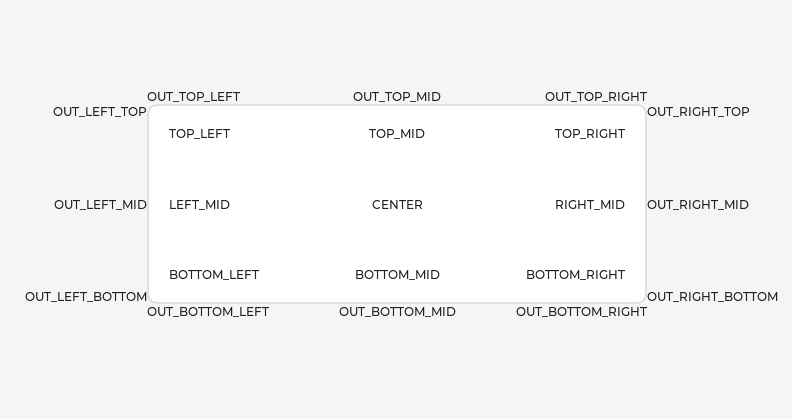
可以使用 lv_obj_set_align(obj, LV_ALIGN_...) 在父对象上对齐对象。之后,每个 x 和 y 设置都将相对于设置的对齐模式。
例如,这将对象从父对象的中心偏移 10;20 像素:
lv_obj_set_align(obj, LV_ALIGN_CENTER);
lv_obj_set_pos(obj, 10, 20);

// 或者使用一个函数
lv_obj_align(obj, LV_ALIGN_CENTER, 10, 20);
要将一个对象对齐到另一个对象,请使用:lv_obj_align_to(obj_to_align, obj_reference, LV_ALIGN_..., x, y)。
例如,将文本对齐到图像下方:lv_obj_align_to(text, image, LV_ALIGN_OUT_BOTTOM_MID, 0, 10)。
以下是存在的对齐类型:
父对象和子对象
可以使用 lv_obj_set_parent(obj, new_parent) 为对象设置一个新的父对象。要获取当前父对象,请使用 lv_obj_get_parent(obj)。
要获取父对象的特定子对象,请使用 lv_obj_get_child(parent, idx)。以下是 idx 的一些示例:
0获取第一个创建的子对象1获取第二个创建的子对象-1获取最后创建的子对象
可以像这样迭代子对象:
uint32_t i;
for(i = 0; i < lv_obj_get_child_cnt(parent); i++) {
  lv_obj_t * child = lv_obj_get_child(parent, i);
  /*对子对象执行操作*/
}
lv_obj_get_index(obj) 返回对象在其父对象中的索引。它等同于父对象中较年轻子对象的数量。
可以使用 lv_obj_move_foreground(obj) 和 lv_obj_move_background(obj) 将对象移到前景或发送到背景。
可以使用 lv_obj_move_to_index(obj, index) 更改对象在其父对象中的索引。
可以使用 lv_obj_swap(obj1, obj2) 交换两个对象的位置。
显示和屏幕
在 LVGL 对象层次结构的最高级别是显示,它表示显示设备(物理显示或模拟器)的驱动程序。一个显示可以有一个或多个与之关联的屏幕。每个屏幕包含一个对象层次结构,用于表示覆盖整个显示的布局的图形小部件。
当您创建了一个屏幕,例如 lv_obj_t * screen = lv_obj_create(NULL),可以使用 lv_scr_load(screen) 将其设置为活动屏幕。lv_scr_act() 函数为您提供指向活动屏幕的指针。
如果您有多个显示器,重要的是要知道屏幕功能操作的是最近创建的显示器或通过 lv_disp_set_default 显式选择的显示器。
要获取对象的屏幕,请使用 lv_obj_get_screen(obj) 函数。
事件
要为对象设置事件回调,请使用 lv_obj_add_event_cb(obj, event_cb, LV_EVENT_..., user_data)。
要手动向对象发送事件,请使用 lv_event_send(obj, LV_EVENT_..., param)。
阅读事件概述以了解更多关于事件的信息。
样式
请务必阅读样式概述。这里只描述了最基本的功能。
可以使用 lv_obj_add_style(obj, &new_style, selector) 函数将新样式添加到对象。
selector 是部分和状态的 OR 组合。例如 LV_PART_SCROLLBAR | LV_STATE_PRESSED。
基础对象使用 LV_PART_MAIN 样式属性和 LV_PART_SCROLLBAR,具有典型的背景样式属性。
标志
可以通过 lv_obj_add/clear_flag(obj, LV_OBJ_FLAG_...) 启用/禁用某些属性:
LV_OBJ_FLAG_HIDDEN使对象隐藏。(就像它根本不存在一样)LV_OBJ_FLAG_CLICKABLE使对象可被输入设备点击LV_OBJ_FLAG_CLICK_FOCUSABLE点击时为对象添加焦点状态LV_OBJ_FLAG_CHECKABLE点击对象时切换选中状态LV_OBJ_FLAG_SCROLLABLE使对象可滚动LV_OBJ_FLAG_SCROLL_ELASTIC允许在内部滚动但速度较慢LV_OBJ_FLAG_SCROLL_MOMENTUM使对象在“抛出”时滚动更远LV_OBJ_FLAG_SCROLL_ONE仅允许滚动一个可捕捉的子对象LV_OBJ_FLAG_SCROLL_CHAIN_HOR允许将水平滚动传播到父对象LV_OBJ_FLAG_SCROLL_CHAIN_VER允许将垂直滚动传播到父对象LV_OBJ_FLAG_SCROLL_CHAIN简单包装(LV_OBJ_FLAG_SCROLL_CHAIN_HOR | LV_OBJ_FLAG_SCROLL_CHAIN_VER)LV_OBJ_FLAG_SCROLL_ON_FOCUS在聚焦时自动滚动对象以使其可见LV_OBJ_FLAG_SCROLL_WITH_ARROW允许使用箭头键滚动聚焦对象LV_OBJ_FLAG_SNAPPABLE如果父对象启用了滚动捕捉,则可以捕捉到此对象LV_OBJ_FLAG_PRESS_LOCK即使按压滑出对象,也保持对象按压状态LV_OBJ_FLAG_EVENT_BUBBLE将事件传播到父对象LV_OBJ_FLAG_GESTURE_BUBBLE将手势传播到父对象LV_OBJ_FLAG_ADV_HITTEST允许执行更精确的命中(点击)测试。例如,考虑到圆角LV_OBJ_FLAG_IGNORE_LAYOUT使对象可由布局定位LV_OBJ_FLAG_FLOATING当父对象滚动时不滚动对象并忽略布局LV_OBJ_FLAG_OVERFLOW_VISIBLE不将子对象的内容裁剪到父对象的边界LV_OBJ_FLAG_LAYOUT_1自定义标志,可由布局自由使用LV_OBJ_FLAG_LAYOUT_2自定义标志,可由布局自由使用LV_OBJ_FLAG_WIDGET_1自定义标志,可由小部件自由使用LV_OBJ_FLAG_WIDGET_2自定义标志,可由小部件自由使用LV_OBJ_FLAG_USER_1自定义标志,可由用户自由使用LV_OBJ_FLAG_USER_2自定义标志,可由用户自由使用LV_OBJ_FLAG_USER_3自定义标志,可由用户自由使用LV_OBJ_FLAG_USER_4自定义标志,可由用户自由使用
一些示例:
/*隐藏对象*/
lv_obj_add_flag(obj, LV_OBJ_FLAG_HIDDEN);

/*使对象不可点击*/
lv_obj_clear_flag(obj, LV_OBJ_FLAG_CLICKABLE);
组
阅读输入设备概述以了解更多关于组的信息。
可以使用 lv_group_add_obj(group, obj) 将对象添加到组,并可以使用 lv_obj_get_group(obj) 查看对象属于哪个组。
lv_obj_is_focused(obj) 返回对象当前是否在其组中聚焦。如果对象未添加到组中,将返回 false。
扩展点击区域
默认情况下,仅在对象的边界区域内可以点击对象。然而,可以使用 lv_obj_set_ext_click_area(obj, size) 扩展点击区域。
事件
LV_EVENT_VALUE_CHANGED当启用LV_OBJ_FLAG_CHECKABLE标志并点击对象时(在选中状态之间切换时)LV_EVENT_DRAW_PART_BEGIN和LV_EVENT_DRAW_PART_END会为以下类型发送:LV_OBJ_DRAW_PART_RECTANGLE主矩形part:LV_PART_MAINrect_dscdraw_area: 矩形的区域
LV_OBJ_DRAW_PART_BORDER_POST如果border_post样式属性为true,则绘制边框part:LV_PART_MAINrect_dscdraw_area: 矩形的区域
LV_OBJ_DRAW_PART_SCROLLBAR滚动条part:LV_PART_SCROLLBARrect_dscdraw_area: 矩形的区域
了解更多关于事件的信息。
按键
如果启用了 LV_OBJ_FLAG_CHECKABLE,LV_KEY_RIGHT 和 LV_KEY_UP 使对象选中,LV_KEY_LEFT 和 LV_KEY_DOWN 使对象未选中。
如果启用了 LV_OBJ_FLAG_SCROLLABLE,但对象不可编辑(由小部件类声明),箭头键(LV_KEY_UP、LV_KEY_DOWN、LV_KEY_LEFT、LV_KEY_RIGHT)滚动对象。如果对象只能垂直滚动,LV_KEY_LEFT 和 LV_KEY_RIGHT 将向上/向下滚动,从而使其与编码器输入设备兼容。有关编码器行为和编辑模式的更多信息,请参阅输入设备概述。
了解更多关于按键的信息。
示例
Base objects with custom styles
C code
GitHub#include "../../lv_examples.h"
#if LV_BUILD_EXAMPLES
void lv_example_obj_1(void)
{
lv_obj_t * obj1;
obj1 = lv_obj_create(lv_scr_act());
lv_obj_set_size(obj1, 100, 50);
lv_obj_align(obj1, LV_ALIGN_CENTER, -60, -30);
static lv_style_t style_shadow;
lv_style_init(&style_shadow);
lv_style_set_shadow_width(&style_shadow, 10);
lv_style_set_shadow_spread(&style_shadow, 5);
lv_style_set_shadow_color(&style_shadow, lv_palette_main(LV_PALETTE_BLUE));
lv_obj_t * obj2;
obj2 = lv_obj_create(lv_scr_act());
lv_obj_add_style(obj2, &style_shadow, 0);
lv_obj_align(obj2, LV_ALIGN_CENTER, 60, 30);
}
#endif
obj1 = lv.obj(lv.scr_act())
obj1.set_size(100, 50)
obj1.align(lv.ALIGN.CENTER, -60, -30)

style_shadow = lv.style_t()
style_shadow.init()
style_shadow.set_shadow_width(10)
style_shadow.set_shadow_spread(5)
style_shadow.set_shadow_color(lv.palette_main(lv.PALETTE.BLUE))

obj2 = lv.obj(lv.scr_act())
obj2.add_style(style_shadow, 0)
obj2.align(lv.ALIGN.CENTER, 60, 30)
Make an object draggable
C code
GitHub#include "../../lv_examples.h"
#if LV_BUILD_EXAMPLES
static void drag_event_handler(lv_event_t * e)
{
lv_obj_t * obj = lv_event_get_target(e);
lv_indev_t * indev = lv_indev_get_act();
if(indev == NULL) return;
lv_point_t vect;
lv_indev_get_vect(indev, &vect);
lv_coord_t x = lv_obj_get_x(obj) + vect.x;
lv_coord_t y = lv_obj_get_y(obj) + vect.y;
lv_obj_set_pos(obj, x, y);
}
/**
* Make an object dragable.
*/
void lv_example_obj_2(void)
{
lv_obj_t * obj;
obj = lv_obj_create(lv_scr_act());
lv_obj_set_size(obj, 150, 100);
lv_obj_add_event_cb(obj, drag_event_handler, LV_EVENT_PRESSING, NULL);
lv_obj_t * label = lv_label_create(obj);
lv_label_set_text(label, "Drag me");
lv_obj_center(label);
}
#endif
def drag_event_handler(e):

    obj = e.get_target()

    indev = lv.indev_get_act()

    vect = lv.point_t()
    indev.get_vect(vect)
    x = obj.get_x() + vect.x
    y = obj.get_y() + vect.y
    obj.set_pos(x, y)


#
# Make an object dragable.
#

obj = lv.obj(lv.scr_act())
obj.set_size(150, 100)
obj.add_event_cb(drag_event_handler, lv.EVENT.PRESSING, None)

label = lv.label(obj)
label.set_text("Drag me")
label.center()
API
Enums
-
Possible states of a widget. OR-ed values are possible
Values:
-
enumerator
LV_STATE_DEFAULT
-
enumerator
LV_STATE_CHECKED
-
enumerator
LV_STATE_FOCUSED
-
enumerator
LV_STATE_FOCUS_KEY
-
enumerator
LV_STATE_EDITED
-
enumerator
LV_STATE_HOVERED
-
enumerator
LV_STATE_PRESSED
-
enumerator
LV_STATE_SCROLLED
-
enumerator
LV_STATE_DISABLED
-
enumerator
LV_STATE_USER_1
-
enumerator
LV_STATE_USER_2
-
enumerator
LV_STATE_USER_3
-
enumerator
LV_STATE_USER_4
-
enumerator
LV_STATE_ANY¶ Special value can be used in some functions to target all states
-
enumerator
-
The possible parts of widgets. The parts can be considered as the internal building block of the widgets. E.g. slider = background + indicator + knob Not all parts are used by every widget
Values:
-
enumerator
LV_PART_MAIN¶ A background like rectangle
-
enumerator
LV_PART_SCROLLBAR¶ The scrollbar(s)
-
enumerator
LV_PART_INDICATOR¶ Indicator, e.g. for slider, bar, switch, or the tick box of the checkbox
-
enumerator
LV_PART_KNOB¶ Like handle to grab to adjust the value
-
enumerator
LV_PART_SELECTED¶ Indicate the currently selected option or section
-
enumerator
LV_PART_ITEMS¶ Used if the widget has multiple similar elements (e.g. table cells)
-
enumerator
LV_PART_TICKS¶ Ticks on scale e.g. for a chart or meter
-
enumerator
LV_PART_CURSOR¶ Mark a specific place e.g. for text area's cursor or on a chart
-
enumerator
LV_PART_CUSTOM_FIRST¶ Extension point for custom widgets
-
enumerator
LV_PART_ANY¶ Special value can be used in some functions to target all parts
-
enumerator
-
On/Off features controlling the object's behavior. OR-ed values are possible
Values:
-
enumerator
LV_OBJ_FLAG_HIDDEN¶ Make the object hidden. (Like it wasn't there at all)
-
enumerator
LV_OBJ_FLAG_CLICKABLE¶ Make the object clickable by the input devices
-
enumerator
LV_OBJ_FLAG_CLICK_FOCUSABLE¶ Add focused state to the object when clicked
-
enumerator
LV_OBJ_FLAG_CHECKABLE¶ Toggle checked state when the object is clicked
-
enumerator
LV_OBJ_FLAG_SCROLLABLE¶ Make the object scrollable
-
enumerator
LV_OBJ_FLAG_SCROLL_ELASTIC¶ Allow scrolling inside but with slower speed
-
enumerator
LV_OBJ_FLAG_SCROLL_MOMENTUM¶ Make the object scroll further when "thrown"
-
enumerator
LV_OBJ_FLAG_SCROLL_ONE¶ Allow scrolling only one snappable children
-
enumerator
LV_OBJ_FLAG_SCROLL_CHAIN_HOR¶ Allow propagating the horizontal scroll to a parent
-
enumerator
LV_OBJ_FLAG_SCROLL_CHAIN_VER¶ Allow propagating the vertical scroll to a parent
-
enumerator
LV_OBJ_FLAG_SCROLL_CHAIN
-
enumerator
LV_OBJ_FLAG_SCROLL_ON_FOCUS¶ Automatically scroll object to make it visible when focused
-
enumerator
LV_OBJ_FLAG_SCROLL_WITH_ARROW¶ Allow scrolling the focused object with arrow keys
-
enumerator
LV_OBJ_FLAG_SNAPPABLE¶ If scroll snap is enabled on the parent it can snap to this object
-
enumerator
LV_OBJ_FLAG_PRESS_LOCK¶ Keep the object pressed even if the press slid from the object
-
enumerator
LV_OBJ_FLAG_EVENT_BUBBLE¶ Propagate the events to the parent too
-
enumerator
LV_OBJ_FLAG_GESTURE_BUBBLE¶ Propagate the gestures to the parent
-
enumerator
LV_OBJ_FLAG_ADV_HITTEST¶ Allow performing more accurate hit (click) test. E.g. consider rounded corners.
-
enumerator
LV_OBJ_FLAG_IGNORE_LAYOUT¶ Make the object position-able by the layouts
-
enumerator
LV_OBJ_FLAG_FLOATING¶ Do not scroll the object when the parent scrolls and ignore layout
-
enumerator
LV_OBJ_FLAG_OVERFLOW_VISIBLE¶ Do not clip the children's content to the parent's boundary
-
enumerator
LV_OBJ_FLAG_LAYOUT_1¶ Custom flag, free to use by layouts
-
enumerator
LV_OBJ_FLAG_LAYOUT_2¶ Custom flag, free to use by layouts
-
enumerator
LV_OBJ_FLAG_WIDGET_1¶ Custom flag, free to use by widget
-
enumerator
LV_OBJ_FLAG_WIDGET_2¶ Custom flag, free to use by widget
-
enumerator
LV_OBJ_FLAG_USER_1¶ Custom flag, free to use by user
-
enumerator
LV_OBJ_FLAG_USER_2¶ Custom flag, free to use by user
-
enumerator
LV_OBJ_FLAG_USER_3¶ Custom flag, free to use by user
-
enumerator
LV_OBJ_FLAG_USER_4¶ Custom flag, free to use by user
-
enumerator
-
enum
lv_obj_draw_part_type_t¶ typefield inlv_obj_draw_part_dsc_tifclass_p = lv_obj_classUsed inLV_EVENT_DRAW_PART_BEGINandLV_EVENT_DRAW_PART_ENDValues:
-
enumerator
LV_OBJ_DRAW_PART_RECTANGLE¶ The main rectangle
-
enumerator
LV_OBJ_DRAW_PART_BORDER_POST¶ The border if style_border_post = true
-
enumerator
LV_OBJ_DRAW_PART_SCROLLBAR¶ The scrollbar
-
enumerator
Functions
-
void
lv_init(void)¶ Initialize LVGL library. Should be called before any other LVGL related function.
-
void
lv_deinit(void)¶ Deinit the 'lv' library Currently only implemented when not using custom allocators, or GC is enabled.
-
bool
lv_is_initialized(void)¶ Returns whether the 'lv' library is currently initialized
-
lv_obj_t *
lv_obj_create(lv_obj_t *parent)¶ Create a base object (a rectangle)
- Parameters
parent -- pointer to a parent object. If NULL then a screen will be created.
- Returns
pointer to the new object
-
void
lv_obj_add_flag(lv_obj_t *obj, lv_obj_flag_t f)¶ Set one or more flags
- Parameters
obj -- pointer to an object
f -- R-ed values from
lv_obj_flag_tto set.
-
void
lv_obj_clear_flag(lv_obj_t *obj, lv_obj_flag_t f)¶ Clear one or more flags
- Parameters
obj -- pointer to an object
f -- OR-ed values from
lv_obj_flag_tto set.
-
void
lv_obj_add_state(lv_obj_t *obj, lv_state_t state)¶ Add one or more states to the object. The other state bits will remain unchanged. If specified in the styles, transition animation will be started from the previous state to the current.
- Parameters
obj -- pointer to an object
state -- the states to add. E.g
LV_STATE_PRESSED | LV_STATE_FOCUSED
-
void
lv_obj_clear_state(lv_obj_t *obj, lv_state_t state)¶ Remove one or more states to the object. The other state bits will remain unchanged. If specified in the styles, transition animation will be started from the previous state to the current.
- Parameters
obj -- pointer to an object
state -- the states to add. E.g
LV_STATE_PRESSED | LV_STATE_FOCUSED
-
static inline void
lv_obj_set_user_data(lv_obj_t *obj, void *user_data)¶ Set the user_data field of the object
- Parameters
obj -- pointer to an object
user_data -- pointer to the new user_data.
-
bool
lv_obj_has_flag(const lv_obj_t *obj, lv_obj_flag_t f)¶ Check if a given flag or all the given flags are set on an object.
- Parameters
obj -- pointer to an object
f -- the flag(s) to check (OR-ed values can be used)
- Returns
true: all flags are set; false: not all flags are set
-
bool
lv_obj_has_flag_any(const lv_obj_t *obj, lv_obj_flag_t f)¶ Check if a given flag or any of the flags are set on an object.
- Parameters
obj -- pointer to an object
f -- the flag(s) to check (OR-ed values can be used)
- Returns
true: at lest one flag flag is set; false: none of the flags are set
-
lv_state_t
lv_obj_get_state(const lv_obj_t *obj)¶ Get the state of an object
- Parameters
obj -- pointer to an object
- Returns
the state (OR-ed values from
lv_state_t)
-
bool
lv_obj_has_state(const lv_obj_t *obj, lv_state_t state)¶ Check if the object is in a given state or not.
- Parameters
obj -- pointer to an object
state -- a state or combination of states to check
- Returns
true:
objis instate; false:objis not instate
-
void *
lv_obj_get_group(const lv_obj_t *obj)¶ Get the group of the object
- Parameters
obj -- pointer to an object
- Returns
the pointer to group of the object
-
static inline void *
lv_obj_get_user_data(lv_obj_t *obj)¶ Get the user_data field of the object
- Parameters
obj -- pointer to an object
- Returns
the pointer to the user_data of the object
-
void
lv_obj_allocate_spec_attr(lv_obj_t *obj)¶ Allocate special data for an object if not allocated yet.
- Parameters
obj -- pointer to an object
-
bool
lv_obj_check_type(const lv_obj_t *obj, const lv_obj_class_t *class_p)¶ Check the type of obj.
- Parameters
obj -- pointer to an object
class_p -- a class to check (e.g.
lv_slider_class)
- Returns
true:
class_pis theobjclass.
-
bool
lv_obj_has_class(const lv_obj_t *obj, const lv_obj_class_t *class_p)¶ Check if any object has a given class (type). It checks the ancestor classes too.
- Parameters
obj -- pointer to an object
class_p -- a class to check (e.g.
lv_slider_class)
- Returns
true:
objhas the given class
-
const lv_obj_class_t *
lv_obj_get_class(const lv_obj_t *obj)¶ Get the class (type) of the object
- Parameters
obj -- pointer to an object
- Returns
the class (type) of the object
-
bool
lv_obj_is_valid(const lv_obj_t *obj)¶ Check if any object is still "alive".
- Parameters
obj -- pointer to an object
- Returns
true: valid
-
static inline lv_coord_t
lv_obj_dpx(const lv_obj_t *obj, lv_coord_t n)¶ Scale the given number of pixels (a distance or size) relative to a 160 DPI display considering the DPI of the
obj's display. It ensures that e.g.lv_dpx(100)will have the same physical size regardless to the DPI of the display.- Parameters
obj -- an object whose display's dpi should be considered
n -- the number of pixels to scale
- Returns
n x current_dpi/160
Variables
-
const lv_obj_class_t
lv_obj_class¶ Make the base object's class publicly available.
-
struct
_lv_obj_spec_attr_t¶ - #include <lv_obj.h>
Special, rarely used attributes. They are allocated automatically if any elements is set.
Public Members
-
uint32_t
child_cnt¶ Number of children
-
lv_group_t *
group_p
-
struct _lv_event_dsc_t *
event_dsc¶ Dynamically allocated event callback and user data array
-
lv_point_t
scroll¶ The current X/Y scroll offset
-
lv_coord_t
ext_click_pad¶ Extra click padding in all direction
-
lv_coord_t
ext_draw_size¶ EXTend the size in every direction for drawing.
-
lv_scrollbar_mode_t
scrollbar_mode¶ How to display scrollbars
-
lv_scroll_snap_t
scroll_snap_x¶ Where to align the snappable children horizontally
-
lv_scroll_snap_t
scroll_snap_y¶ Where to align the snappable children vertically
-
lv_dir_t
scroll_dir¶ The allowed scroll direction(s)
-
uint8_t
event_dsc_cnt¶ Number of event callbacks stored in
event_dscarray
-
uint8_t
layer_type¶ Cache the layer type here. Element of @lv_intermediate_layer_type_t
-
uint32_t
-
struct
_lv_obj_t¶ Public Members
-
const lv_obj_class_t *
class_p
-
_lv_obj_spec_attr_t *
spec_attr
-
_lv_obj_style_t *
styles
-
void *
user_data
-
lv_area_t
coords
-
lv_obj_flag_t
flags
-
lv_state_t
state
-
uint16_t
layout_inv
-
uint16_t
scr_layout_inv
-
uint16_t
skip_trans
-
uint16_t
style_cnt
-
uint16_t
h_layout
-
uint16_t
w_layout
-
const lv_obj_class_t *